
1001GROUP
  • 0 Carrello
  • Home
  • Negozio
    • Sfoglia tutto
    • Hosting Cheap
    • Certificati SSL
    • Servizi E-mail
    • Registra un Nuovo Dominio
  • Comunicazioni
  • Archivio Domande
  • Stato del Network
  • Affiliati
  • Contattaci!
  • Altro
  • Account
    • Accedi
    • Registrati
    • Password dimenticata?
  1. Home
  2. Archivio Domande
  3. CloudLinux (cPanel)
  4. How to Change the PHP Version via CloudLinux Selector in cPanel

  Categorie

Backup/Restore
4
Cloudflare (cPanel)
9
CloudLinux (cPanel)
10
cPanel - Control Panel
24
Databases
11
DirectAdmin
48
DNS - Nameservers
6
Domain Management
10
Email
17
FTP
9
Installing a Control Panel
6
Mail Filters & SPAM
8
Mobile
11
Others
3
PayPal
7
Plesk
47
Security
10
SiteWorx (Control Panel)
58
Softaculous
69
SolusVM
18
SSL
5
Virtualizor
19
WHM
18
WordPress
17

  Categorie

  Assistenza

I miei ticket
Comunicazioni
Archivio Domande
Download
Stato del Network
Apri Ticket

How to Change the PHP Version via CloudLinux Selector in cPanel Stampa

  • 0


You can use CloudLinux's Select PHP Version to change your website's PHP Version. CloudLinux provides various PHP Versions to choose from.


1. Log in to your cPanel account.

2. In the Software section, click on Select PHP Version.

cP-CL-Select-PHP-Version-icon.gif


3. To the right side of the Current PHP version, click on the drop-down menu and choose the version you want to use.
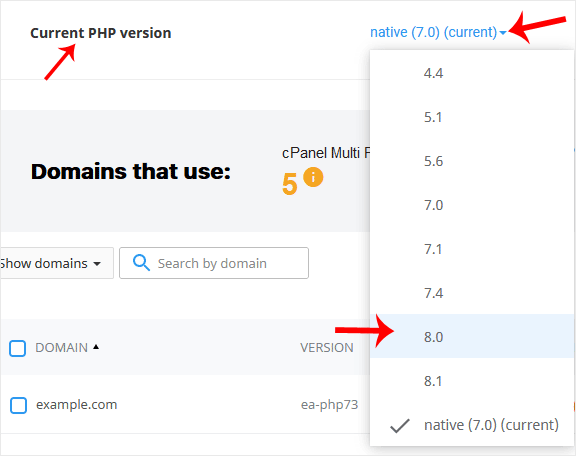
cP-CL-current-PHP-version-option.gif


4. Click Set as current.

cl-set-as-PHP-version.gif


Hai trovato utile questa risposta?

Articoli Correlati

How to Increase PHP's upload_max_filesize Value Using CloudLinux Selector in cPanel   You can modify PHP's upload_max_filesize as per your needs using CloudLinux's PHP Selector in... How to Increase PHP's post_max_size Value Using CloudLinux's Selector in cPanel   You can modify PHP post_max_size as per your needs using CloudLinux PHP Selector in cPanel.... How to Enable or Disable PHP Extensions Using the CloudLinux Selector in cPanel   You can use CloudLinux Selector to enable or disable available PHP extensions in cPanel.... How to Enable or Disable PHP's allow_url_fopen Using CloudLinux Selector in cPanel   You can use CloudLinux Selector to enable or disable the allow_url_fopen directive in cPanel.... How to Enable or Disable PHP's display_errors via CloudLinux Selector in cPanel   Sometimes, we need to debug PHP. Hence, we need to enable display_errors or disable them for...
« Indietro

  Assistenza

I miei ticket
Comunicazioni
Archivio Domande
Download
Stato del Network
Apri Ticket
  • Contattaci!
  • Termini e Condizioni del servizio

Diritto d'autore © 2026 1001GROUP. Tutti i diritti riservati.


Caricamento...
Caricamento...
Scegli lingua
العربية
Azerbaijani
Català
中文
Hrvatski
Čeština
Dansk
Nederlands
English
Estonian
Persian
Français
Deutsch
עברית
Magyar
Italiano
Macedonian
Norwegian
Português
Português
Română
Русский
Español
Svenska
Türkçe
Українська
Tiếng Việt

Scegli la valuta

$ USD
VND

Genera password

Inserisci un numero compreso tra 8 e 64 per la lunghezza della password