1001GROUP
  • 0 Mein Warenkorb
  • Kundencenter Home
  • Shop
    • Alle anzeigen
    • Bản Quyền Phần Mềm
    • Domain registrieren
  • Ankündigungen
  • Wissensdatenbank
  • Netzwerkstatus
  • Partner
  • Kontaktieren Sie uns
  • Mehr
  • Konto
    • Einloggen
    • Registrieren
    • Passwort vergessen?
  1. Support
  2. Wissensdatenbank
  3. Security
  4. How to Disable the Two-Factor Authentication on Your cPanel Account

  Kategorien

Backup/Restore
4
Cloudflare (cPanel)
9
CloudLinux (cPanel)
10
cPanel - Control Panel
24
Databases
11
DirectAdmin
48
DNS - Nameservers
6
Domain Management
10
Email
17
FTP
9
Installing a Control Panel
6
Mail Filters & SPAM
8
Mobile
11
Others
3
PayPal
7
Plesk
47
Security
10
SiteWorx (Control Panel)
58
Softaculous
69
SolusVM
18
SSL
5
Virtualizor
19
WHM
18
WordPress
17

  Kategorien

  Unterstützung

Supporttickets
Ankündigungen
Wissensdatenbank
herunterladbare
Netzwerkstatus
Ticket öffnen

How to Disable the Two-Factor Authentication on Your cPanel Account Drucken

  • 0

Follow this instruction to remove two-factor authentication from your cPanel account.


1. Log in to your cPanel account.


2. In the Security section, click on Two-Factor Authentication.
cpanel-two-factor-authentication-icon.gif

3. Click on Remove Two-Factor Authentication.
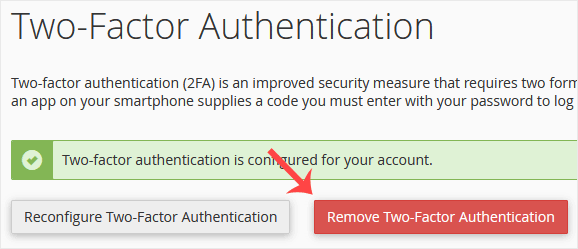
cpanel-two-factor-authentication-disable.gif

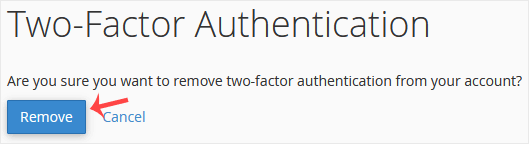
4. For confirmation, click on Remove.
cpanel-2fa-disable-confirm.gif

It should show a message such as Success: The system removed the two-factor authentication from your account.


War diese Antwort hilfreich?

Verwandte Artikel

How to Password Protect a Directory in cPanel You can lock a directory with a password using the cPanel's Directory Privacy. 1. Log in to your... How to Disable Directory Browsing Using the htaccess Rule For security purposes, you should disable directory browsing on your website so no one can see... How to Protect the htaccess File You can prevent unauthorized access to your htaccess file by adding this rule to the file: #... How to Enable the Two-Factor Authentication on Your cPanel Account Security is important for our data safety. We recommend you to enable the Two-Factor... How to Block Any IP Address via an htaccess Rule If you want to block an IP Address, you can add the below lines to your htaccess file. order...
« Zurück

  Unterstützung

Supporttickets
Ankündigungen
Wissensdatenbank
herunterladbare
Netzwerkstatus
Ticket öffnen
  • Kontaktieren Sie uns
  • AGB

Urheberrecht: © 2026 1001GROUP. Alle Rechte vorbehalten.


Lädt...
Lädt...
Sprachwahl
العربية
Azerbaijani
Català
中文
Hrvatski
Čeština
Dansk
Nederlands
English
Estonian
Persian
Français
Deutsch
עברית
Magyar
Italiano
Macedonian
Norwegian
Português
Português
Română
Русский
Español
Svenska
Türkçe
Українська
Tiếng Việt

Währung wählen

$ USD
VND

Passwort generieren

Bitte geben Sie eine Zahl zwischen 8 und 64 für die Passwortlänge ein