
1001GROUP
  • 0 購物車
  • 首頁
  • 商店
    • 瀏覽全部
    • Hosting Cheap
    • SSL 憑證
    • 電子郵件服務
    • 註冊新網域
  • 公告
  • 知識庫
  • 服務狀態
  • 推廣註冊
  • 聯絡我們
  • 更多
  • 帳戶
    • 登入
    • 註冊
    • 忘記密碼?
  1. 客戶系統
  2. 知識庫
  3. Plesk
  4. Domain Management
  5. How to Remove a Subdomain in Plesk

  分類

Backup/Restore
4
Cloudflare (cPanel)
9
CloudLinux (cPanel)
10
cPanel - Control Panel
24
Databases
11
DirectAdmin
48
DNS - Nameservers
6
Domain Management
10
Email
17
FTP
9
Installing a Control Panel
6
Mail Filters & SPAM
8
Mobile
11
Others
3
PayPal
7
Plesk
47
Security
10
SiteWorx (Control Panel)
58
Softaculous
69
SolusVM
18
SSL
5
Virtualizor
19
WHM
18
WordPress
17

  分類

  技術支援

我的服務單
公告
知識庫
下載
服務狀態
建立服務單

How to Remove a Subdomain in Plesk 列印

  • 0

A subdomain is an additional part of your primary domain. Please, follow this tutorial to remove a subdomain in Plesk.


1. Log in to your Plesk account.


2. Click on Websites & Domains from the Sidebar Menu.

plesk-websites-and-domains-menu.gif


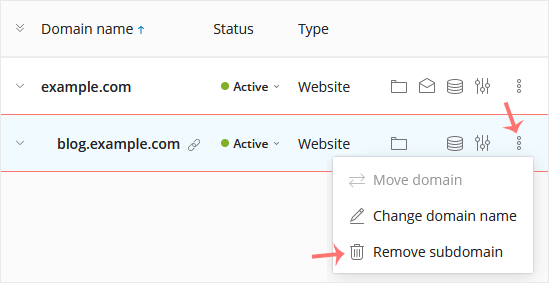
3. Under the list of Domain names, click on the More icon plesk-more-icon.gif in front of the subdomain and select Remove subdomain.
plesk-remove-subdomain.gif


4. Confirm with Yes to remove the subdomain.



這篇文章有幫助嗎?

相關文章

How to Remove a Domain in Plesk   You can remove a domain in Plesk by following this tutorial.   1. Log in to your Plesk... How to Add a Subdomain in Plesk   1. Log in to your Plesk account. 2. Click on Websites & Domains from the Sidebar Menu.... How to Redirect a Subdomain to an External URL in Plesk   1. Log in to your Plesk account.   2. Click on Websites & Domains from the Sidebar Menu.... How to Remove a Subdomain Redirect in Plesk   1. Log in to your Plesk account.   2. Click on Websites & Domains from the Sidebar Menu.... How to Add a New Domain in Plesk   Follow this tutorial to add a new domain to your Plesk account.   1. Log in to your Plesk...
« 返回

  技術支援

我的服務單
公告
知識庫
下載
服務狀態
建立服務單
  • 聯絡我們
  • 服務條款

版權所有 © 2026 1001GROUP。版權所有。


載入中...
載入中...
語言
العربية
Azerbaijani
Català
中文
Hrvatski
Čeština
Dansk
Nederlands
English
Estonian
Persian
Français
Deutsch
עברית
Magyar
Italiano
Macedonian
Norwegian
Português
Português
Română
Русский
Español
Svenska
Türkçe
Українська
Tiếng Việt

選擇貨幣別

$ USD
VND

產生密碼

請輸入 8 至 64 之間的數字來做為密碼長度