
1001GROUP
  • 0 Carro de Comandes
  • Àrea d'Inici clients
  • Botiga
    • Explorar tots
    • Hosting Cheap
    • Certificats SSL
    • Serveis de correu electrònic
    • Registrar un Nou Domini
  • Promocions
  • Preguntes Freqüents - FAQ
  • Estat de la xarxa
  • Afiliacions
  • Contacti'ns
  • Més
  • Compte
    • Entrada
    • Registrar-se
    • Ha perdut la contrasenya?
  1. Administració
  2. Preguntes Freqüents - FAQ
  3. Domain Management
  4. How to Remove Parked Domains/Aliases in cPanel

  Categories

Backup/Restore
4
Cloudflare (cPanel)
9
CloudLinux (cPanel)
10
cPanel - Control Panel
24
Databases
11
DirectAdmin
48
DNS - Nameservers
6
Domain Management
10
Email
17
FTP
9
Installing a Control Panel
6
Mail Filters & SPAM
8
Mobile
11
Others
3
PayPal
7
Plesk
47
Security
10
SiteWorx (Control Panel)
58
Softaculous
69
SolusVM
18
SSL
5
Virtualizor
19
WHM
18
WordPress
17

  Categories

  suport

Els meus Tiquets de suport
Promocions
Preguntes Freqüents - FAQ
Descàrregues
Estat de la xarxa
Tiquet Obert

How to Remove Parked Domains/Aliases in cPanel Imprimir

  • 0

1. Log in to your cPanel account.


2. In the Domains section, click on Aliases.
 

3.
Under Remove Aliases, locate the parked domain name and click on Remove.
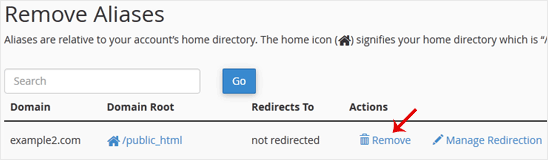


4. For confirmation, click again on Remove Alias.


You should see a message that your parked/alias domain has been removed.


Ha estat útil la resposta?

Articles Relacionats

How to Create an Alias or Park a Domain in cPanel Note: The domain you want to park must point to the DNS of our server.1. Log in to your cPanel... How to Create Addon Domains in cPanel Before adding the addon domain, point your addon domain nameservers to your primary domain... How to Remove an Add-on Domain in cPanel 1. Log in to your cPanel account. 2. In the Domains section, click on Addon Domains.3. Locate... How to Redirect an Add-on Domain in cPanel You can redirect your add-on domain to another domain.1. Log in to your cPanel account. 2. In... How to Redirect a Subdomain to an External URL 1. Log in to your cPanel account.2. In the Domains section, click on Subdomains. 3. Under the...
« Enrere

  suport

Els meus Tiquets de suport
Promocions
Preguntes Freqüents - FAQ
Descàrregues
Estat de la xarxa
Tiquet Obert
  • Contacti'ns
  • Termes del Servei i condicions d'ús

Drets d'autor © 2026 1001GROUP. Tots els drets reservats.


Carregant ...
Carregant ...
Triar idioma
العربية
Azerbaijani
Català
中文
Hrvatski
Čeština
Dansk
Nederlands
English
Estonian
Persian
Français
Deutsch
עברית
Magyar
Italiano
Macedonian
Norwegian
Português
Português
Română
Русский
Español
Svenska
Türkçe
Українська
Tiếng Việt

Triar Divisa

$ USD
VND

Generar contrasenya

Si us plau, introduïu un número entre 8 i 64 per a la longitud de la contrasenya